
Tenantify routes every rent payment through Paystack. You choose how you pay (card, bank transfer, or USSD), and your landlord gets notified automatically. You never have to send proof of payment again.
Who this is for
Tenants with rent due on their dashboard. The flow is the same whether this is your first-month rent bundled with a security deposit or routine monthly rent.
What you’ll get done
One rent payment completed, your dashboard updated, and a digital receipt in your inbox and your payment history.
Before you start
- Your preferred payment method: a Nigerian debit card, an active bank app, or a phone that can dial USSD codes.
- The amount you owe visible on your dashboard. This is usually rent, sometimes plus service charge, sometimes plus security deposit.
Steps
1. Find your payment card on the dashboard
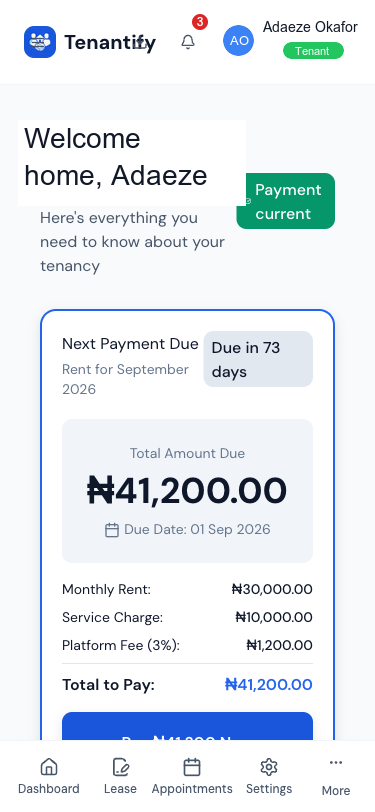
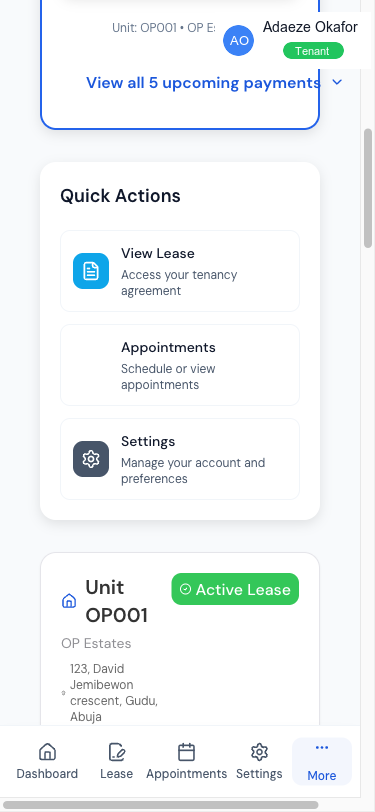
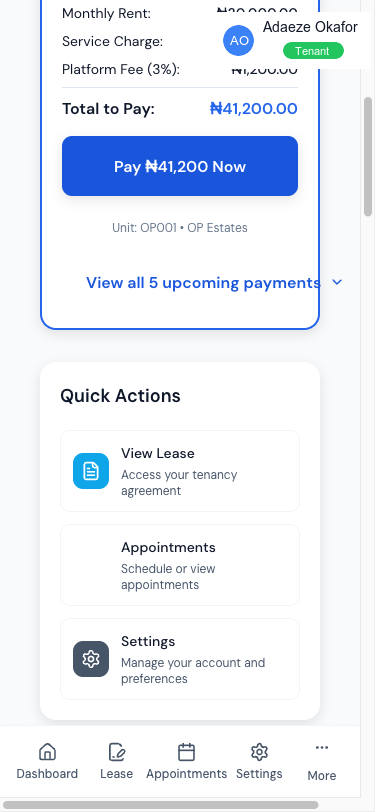
From your tenant dashboard, look for the payment card that shows your upcoming charges. It displays each pending item (RENT, SERVICE_CHARGE, SECURITY_DEPOSIT, AGENCY_FEE), the amount in naira, and a Pay Now button.
2. Click Pay Now
Click Pay Now on the payment card. Tenantify processes each charge as a separate transaction so you can retry or cancel individually if one fails.
3. Review the summary
A confirmation card shows what you’re paying, broken into two lines:
- The base amount your landlord receives (rent, or rent + service charge, or rent + deposit + service charge if this is your first payment).
- The 3% platform fee added on top, capped at ₦50,000 per period. This covers Tenantify’s platform and Paystack’s card-processing fee.
The Total is the sum of the two. That is what your card or bank account is charged. Every receipt you keep will show both lines clearly, so you can reconcile them with your landlord and claim them under the 2025 rent relief law if applicable.
4. Complete the Paystack checkout
After clicking Pay Now, a secure Paystack checkout opens with three tabs:
- Card. Visa, Verve, Mastercard. Most tenants pick this. Usually settles within a minute.
- Bank transfer. Paystack generates a one-time account number. Transfer from your bank app and Paystack confirms within two to five minutes.
- USSD. For tenants on feature phones or without card access. Dial the code Paystack shows and follow the prompts.
5. Complete the payment
- Card. Type your card number, expiry, and CVV. Your bank may ask for a one-time password by SMS or app.
- Bank transfer. Copy the one-time account number. Open your bank app, paste the number, transfer the exact amount. Return to the tab.
- USSD. Dial the displayed code and enter your PIN when prompted.
6. Land on the success page
Paystack routes you back to Tenantify. The callback page checks with Paystack before showing the success screen, which prevents fraud from spoofed confirmation URLs. You see a green tick, the amount paid, and a link to your receipt.
Screenshot coming soon
Step 6: Payment success page
7. Check your inbox
Two emails arrive within a minute:
- A Paystack receipt confirming the charge on your card or account.
- A Tenantify rent receipt naming your landlord, estate, unit, and the month this payment covers. Save this one. Under the 2025 rent relief law, Nigerian tenants claiming rent relief need documented receipts.
What your landlord sees
The moment Paystack confirms the payment, your landlord’s dashboard updates: the schedule row moves from PENDING to PAID, the amount appears in their monthly summary, and they get a notification. You don’t need to screenshot anything.
If something goes wrong
Card declined by your bank. Usually a transaction limit or fraud-protection block. Call your bank, raise the limit for today, or switch to bank transfer.
Bank transfer didn’t confirm. Paystack confirms transfers in two to five minutes. If nothing after fifteen, open the payment detail page on your dashboard. There’s a Verify with Paystack button that checks directly with Paystack’s system.
Paid but the dashboard still shows PENDING. Refresh the page. If still stuck after thirty minutes, email [email protected] with your Paystack reference (on your Paystack receipt).
Double-charged. Extremely rare. If it happens, write to [email protected] with both Paystack references and we refund one.
What’s next
Skip the monthly admin. Setting Up Auto-Pay for Service Charges lets Tenantify handle your recurring service fees automatically.